UX CASE STUDY
ChronoSync: Redefining Workplace Efficiency
One channel only interface between two management systems for employee time and task tracking.
Role:
Product Designer
Type:
Research-Led
Domain:
Cybersecurity
Platform:
Web + Mobile

Overview
Background
Roughly 70% of team leaders were unable to submit their own timesheets on time and were also unable to verify their teams' work.
This created a stressful and inefficient environment for all stakeholders, particularly because the entire financial validation process was only handled by only two people in management.

Challenge
The challenge was to ensure employee time entries were completed accurately and on time, so projects could close without delays and the company could invoice clients promptly.
Goals and Objectives
The goal was to create a single, unified interface that reduced duplication and simplified work across two separate management systems.
Discovery
Process
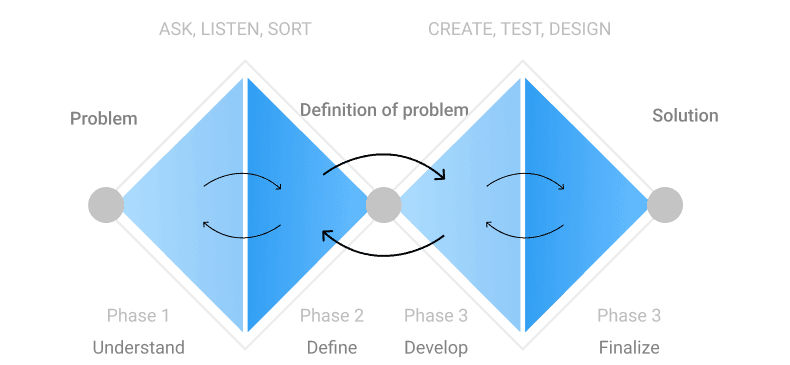
To build a solution that actually worked for everyone, I organized the process into two steps:
[FIRST PHASE] I started with a one-week sprint to look at how other tools solved similar problems and reviewed stakeholder data to quickly decide the best path forward.
[SECOND PHASE] Then, I sat down with the employees for direct interviews to hear about their daily struggles first-hand.
This ensured the final design was a well-informed solution that directly addressed both business goals and user pain points.
User Research
I prioritized direct feedback to ensure we weren't designing in the dark. Since the project involved many different roles, talking to the people actually using the systems was essential.
I remotely interviewed 15 users, including Board/Team Leaders, Consultants, and Financial Responsible individuals, to deeply understand their pain points, workflows across platforms, and gather their suggestions for a truly effective solution.
Understanding Roles
Defining personas allowed me to turn interview data into a clear map of user needs and frustrations. This ensured the design solved specific problems for everyone—from consultants who just want to log tasks quickly to financial managers who need a smoother way to approve expenses.

Launch & Continuous Growth
Problem Definition
A fragmented workflow that forced consultants and management to navigate multiple systems, creating extra workload, confusion, and a constant need to verify consistency across tools.
1
Delayed time submissions
Around 70% of team leaders were unable to submit timesheets on time, creating bottlenecks in the workflow.
2
Limited validation capacity
Managing time entries across two separate systems made the process slow, repetitive, and stressful for stakeholders.
3
Inefficient process flow
Companies face pressure to innovate quickly, especially in a more digital and competitive environment.
Why this is portfolio-worthy
This project matters because it responds to a real workflow problem and shows how a more structured approach can reduce friction for the people using it.
Design
Design Synthesis
The research points to five core design requirements:
Simplify time entry and validation flows.
Centralize approvals and visibility.
Make system rules easier to understand.
Support faster search and navigation.
Reduce friction across roles.
Wireframing
My design process was collaborative and iterative. I used periodic prototyping to test new data and to ensure my designs were feasible for the development team. This continuous validation helped us create a more robust and effective final product.

Moodboard
The design system was created to align with and elevate the company's existing products.
My goal was to establish a cohesive visual language
including a clear color palette and typography
that would ensure a unified and professional aesthetic across all platforms.

Execution
Final Product
Following the initial release, we successfully met our core objective of creating a unified platform. However, the design and its functionalities were always intended to be an ongoing project, with continuous enhancements planned based on user feedback and evolving business needs.
A small prototype was created due to an NDA.
Results
The rollout was designed to support adoption smoothly, resulting in strong usage, positive feedback, and an easier transition for employees.
1
80% adoption rate
A gradual rollout helped users transition without disrupting their routine.
2
Positive employee feedback
The new experience was perceived as faster and easier to use.
3
Low-friction change management
Running both systems in parallel supported smoother onboarding to the new flow.